This article is part 2 of the Natvis-like experience with GDB pretty printers series:
GDB lacks a lot of the features of natvis, and I had to implement their equivalents for GDB pretty printers myself.
Printer behind pointer
For a pointer value like idEntity*, MSVC debugger shows the address followed by the display string of the pointee, while GDB only shows the raw address. Both allow to expand the value to see the children of the pointee, but in case of MSVC that would be natvis-customized children, while GDB would display the raw members. GDB just does not apply pretty printer of the pointee automatically.
Here you can see: CLion in its normal state, CLion with idEntity pretty printer applied through pointer, MSVC with natvis applied.
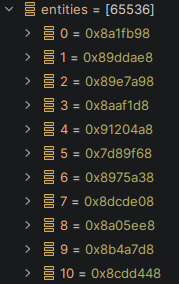
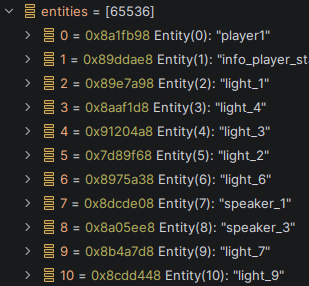
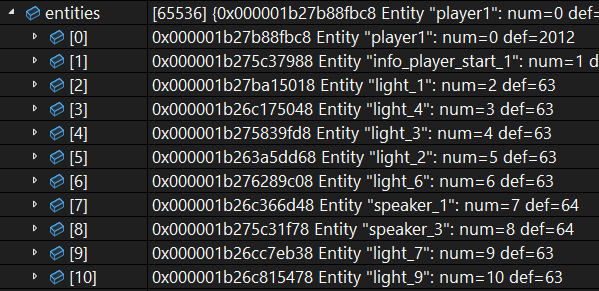
The standard RegexpCollectionPrettyPrinter does not support this case out of the box, it is necessary to implement a custom class derived from PrettyPrinter. A custom class allows to inspect every incoming gdb.Value and match pretty printer based on its type or even the actual value.
Here is how I match references and pointers to the pretty printer of the value type:
class TdmPrettyPrinterCollection(gdb.printing.PrettyPrinter):
    # called by GDB to find pretty-printer
    def __call__(self, value):
        ...
        # resolve 'as is': works for value types
        printer = self._find_printer_maybe_derived(value.type, False)
        if printer:
            return printer.gen_printer(value)

        # avoid TYPE_CODE_TYPEDEF below
        value = value.cast(gdb.types.get_basic_type(value.type))

        # resolve reference type
        if value.type.code == gdb.TYPE_CODE_REF or value.type.code == gdb.TYPE_CODE_RVALUE_REF:
            target_value = value.referenced_value()
            printer = self._find_printer_maybe_derived(target_value.type, False)
            if printer:
                return printer.gen_printer(target_value)

        # resolve pointer type (address is prepended)
        if value.type.code == gdb.TYPE_CODE_PTR:
            if int(value) == 0:
                return LiteralStringPrinter('null')
            prefix = '0x{:x} '.format(int(value))
            try:
                target_value = value.dereference()
            except:
                return LiteralStringPrinter('bad')  # includes pointer to void
            printer = self._find_printer_maybe_derived(target_value.type, True)
            if printer:
                return PrefixPrinter(prefix, printer.gen_printer(target_value))
        ...
A few implementations details:
-
You have probably noticed a call to
gdb.types.get_basic_type. This has to be used a lot, because typedef is a separate type of kindgdb.TYPE_CODE_TYPEDEF, and without resolving it you can't see whether it is really a struct/pointer/reference/integer/etc. -
There is try/catch around pointer dereference. I don't like such blatant silencing of all kind of errors, but this is the only way to work with pointers reliably. A pointer can be null, void, function, member, uninitialized, and in all of these cases you get an exception.
The type of variable printer is derived from gdb.printing.SubPrettyPrinter, and printer.gen_printer is the actual constructor of the pretty printer with to_string / children methods.
The code uses a few simple pretty printers:
# displays given string, no children
class LiteralStringPrinter:
    def __init__(self, literal):
        assert isinstance(literal, str)
        self.literal = literal

    def to_string(self):
        return self.literal

# wraps the given pretty printer: prepends given prefix to its display string
class PrefixPrinter:
    def __init__(self, prefix, pointee_printer):
        assert isinstance(prefix, str)
        self.pointee_printer = pointee_printer
        self.prefix = prefix

    def to_string(self):
        try:    # printer can have no 'to_string' method
            res = str(self.pointee_printer.to_string())
        except:
            res = '???'
        return self.prefix + res

    def children(self):
        try:    # printer can have no 'children' method
            return self.pointee_printer.children()
        except:
            return []
Printers registration
Now we have to select pretty printers by C++ type ourselves, so we can choose how to do the type matching exactly. I found it convenient to declare various attributes on a pretty printer as class static members, and automatically take them into account during type match:
class TdmPrettyPrinterCollection(gdb.printing.PrettyPrinter):
    ...
    # --------- registration: take properties from class static member
    def add_printer_implicit(self, gen_printer):
        kwargs = {}
        for pn in ['wildcard', 'name', 'allow_pointer', 'allow_derived']:
            if hasattr(gen_printer, pn):
                kwargs[pn] = getattr(gen_printer, pn)
        self.add_printer(gen_printer, **kwargs)

    @staticmethod
    def create_with_printers(name, gen_printer_list):
        ppcoll = TdmPrettyPrinterCollection(name)
        for gp in gen_printer_list:
            ppcoll.add_printer_implicit(gp)
        return ppcoll

    class TdmSubprinter(gdb.printing.SubPrettyPrinter):
        def __init__(self, gen_printer, matcher, *,
                    wildcard = None,
                    name = None,
                    allow_pointer = True, allow_derived = False):
            assert wildcard, 'Matching criterion not set'
            if not isinstance(wildcard, list):
                wildcard = [wildcard]
            for w in wildcard:
                matcher.add(w, self)

            if name is None:
                name = gen_printer.__name__
            super(TdmPrettyPrinterCollection.TdmSubprinter, self).__init__(name)
            self.gen_printer = gen_printer
            self.allow_pointer = allow_pointer
            self.allow_derived = allow_derived
I found it easier to match type by wildcard. Initially regex was also supported, but it was then eliminated for performance reasons. The matcher object stores all wildcards in a trie by its literal prefix, which is faster to query than matching against many precompiled regexes. In some cases it is useful to set several wildcards on one printer:
class idHashMapPrinter:
    # one specific class regardless of template arguments
    wildcard = 'idHashMap<*>'
    ...
class idListPrinter:
    # covers 3 std::vector-like containers
    wildcard = ['idList<*>', 'idStaticList<*>', 'idFlexList<*>']
    ...
The attribute allow_pointer = False allows to block matching by pointers described just above, and allow_derived = True allows to apply the printer to values of derived type.
Runtime type
If MSVC debugger sees a pointer to an object with RTTI (i.e. with at least once virtual function), then the debugger automatically converts the pointer to its actual runtime type for the sake of the inspection. This feature is especially important for the idEntity hierarchy, since there are so many derived class and most of the code uses base idEntity* pointers. A related but different question is whether a natvis rule for a base type applies to a derived type: both ways are available in natvis thanks to the Inheritable attribute.
In case of GDB, automatic downcasting by RTTI is not enabled by default, but can be enabled like this:
-
set print object on command in GDB console enables this behavior for the types not covered by pretty printers.
-
For the types covered by pretty printers, one has to implement it manually in the type matching.
Luckily, point 2 is quite easy to do in Python:
class TdmPrettyPrinterCollection(gdb.printing.PrettyPrinter):
    ...
    # called by GDB to find pretty-printer
    def __call__(self, value):
        # cast to most derived type based on RTTI
        # natvis does this automatically as well
        dynamic_type = value.dynamic_type
        if dynamic_type != value.type:
            value = value.cast(dynamic_type)
        ...
Now, applying base class printers to derived types is more complicated. This is where we have to look inside the _find_printer_maybe_derived function seen earlier.
class TdmPrettyPrinterCollection(gdb.printing.PrettyPrinter):
    ...
    # find printer for given type; include its base types in the search
    def _find_printer_maybe_derived(self, type, is_deref):
        type = gdb.types.get_basic_type(type)   # avoid TYPE_CODE_TYPEDEF
        if type.code != gdb.TYPE_CODE_STRUCT and type.code != gdb.TYPE_CODE_UNION:
            return None

        base_type_sequence = self._get_base_types(type)

        for i, base_type in enumerate(base_type_sequence):
            typename = self._get_normal_type_name(base_type)
            if not typename:
                continue

            printer = self._find_printer_exact(typename, is_deref, i > 0)
            if printer:
                return printer

    # find printer with specified type name exactly
    def _find_printer_exact(self, typename, is_deref, is_base):
        if not typename:
            return None
        for printer in self.matcher.match(typename):
            if not printer.enabled:
                continue
            if is_deref and not printer.allow_pointer:
                continue
            if is_base and not printer.allow_derived:
                continue
            return printer
        return None

    # returns sequence of base class types
    # starting from specified type and going into bases
    # note: stops on multiple inheritance!
    @staticmethod
    def _get_base_types(type):
        assert type.code != gdb.TYPE_CODE_TYPEDEF
        if type.code != gdb.TYPE_CODE_STRUCT:
            return [type]

        res = []
        while True:
            res.append(type)
            base_names = [f.name for f in type.fields() if f.is_base_class]
            if len(base_names) != 1:
                break   # no base or multiple inheritance

            base_type = gdb.lookup_type(base_names[0])
            type = base_type

        return res

    # same as in the implementation of RegexpCollectionPrettyPrinter
    # most importantly, it follows typedefs and drops const/volatile
    @staticmethod
    def _get_normal_type_name(type):
        typename = gdb.types.get_basic_type(type).tag
        if typename:
            return typename
        return type.name
This is quite an impressive amount of non-trivial boilerplate in our custom gdb.printing.PrettyPrinter implementation just to get the behavior which we assume for granted in natvis.
Printer pinning
The children method of a pretty printer returns an array of (str, gdb.Value) pairs. Each gdb.Value is returned to the debugger, which selects another pretty printer for it without any regard to the context. Sometimes it is desirable to pre-select pretty printer for the value being returned, or pin specific pretty printer to the gdb.Value. Such printer pinning can be used to implement two natvis features: alternative views for a type, and synthetic children.
I have not found any way to achieve this properly in GDB pretty printers. In theory, there are many ways how this could be implemented:
- allowing to return constructed pretty-printer object instead of gdb.Value from children method
- allowing to return some options alongside gdb.Value and passing them into pretty-printers
- allowing to attach arbitrary user data to gdb.Value
I considered several workarounds to achieve the pinning effect:
- Using
setattron gdb.Value to set userdata. The extra attribute is lost, most likely because gdb.Value is copied somewhere inside GDB. - Returning gdb.Value with the same data but some artificial helper type (in a sense, save userinfo inside the type). The ultimate blocker I faced is that gdb.Value data buffer must be of the same size as the C++ type. It means I have to generate too many C++ types, parametrized by sizeof and sequence number.
- Saving everything in a huge global table and returning gdb.Value of artificial type and the index in the table. When debugger creates our special pretty-printer for the artificial type, we read the index and use it to restore back the original gdb.Value and all the extra options.
In the end I managed to make the last approach work. Its greatest weakness is that there is no way to track whether an entry in the global table is still referenced and when it can be discarded, so we have to choose between unbounded memory leak and some values potentially being lost in the debugger. I chose the latter variant and store all the entries in a circular buffer.
First of all, I made an artificial C++ type holding a single integer:
// this is an artificial type which contains a 64-bit integer inside
// it is used by 'embed_printer_for_value' feature of GDB pretty-printers
struct GdbHelper {
    int64_t index;
};

// we must ensure that the type is not stripped from the binary
// global variable seems to be enough for that
GdbHelper g_gdb_helper = {17ll};
Then I implemented a circular buffer with million entries. When debugger tries to add more elements, the oldest ones get evicted. I also implemented a budget on total data size (1 GB), although I think it is not important.
# fixed-size circular buffer
# every added element has ID: you can find it by ID and check if it was removed
# special addition method drops oldest values to keep total size under budget
class GdbHelperCircularBuffer:
    ...

# every gdb.Value with pinned printer is stored in this huge global buffer
# we can't know when they are no longer necessary, so we only remove them after long time when budget is exceeded
g_gdb_helper_table = GdbHelperCircularBuffer(10 ** 6, 10 ** 9)
GdbHelperEntry = namedtuple('GdbHelperEntry', ['value', 'gen_printer', 'size'])
Then, the actual pinning is done by the main function embed_printer_for_value:
# returns artificial gdb.Value which is later resolved to specified (gdb.Value + pretty-printer class) combination
# information is stored in the global table, and entry ID is wrapped into GdbHelper struct
def embed_printer_for_value(value, gen_printer, *, size = None):
    if size is None:
        size = len(value.bytes)
    id = g_gdb_helper_table.add_limited(GdbHelperEntry(value, gen_printer, size))
    helper_type = gdb.lookup_type('GdbHelper')
    assert helper_type and helper_type.sizeof == 8, "Make sure GdbHelper struct exists and is not stripped out."
    helper_value = gdb.Value(id.to_bytes(8, byteorder = 'little'), helper_type)
    return helper_value
And finally, here is the implementation and registration of the pretty-printer for the artificial type:
# pretty-printer for GdbHelper
# extracts entry ID and looks into the global table
def GdbHelperPrinter(value):
    id = int.from_bytes(value.bytes, byteorder = 'little')
    elem = g_gdb_helper_table.get(id)
    if elem is None:
        return LiteralStringPrinter('{{value is obsolete}}')
    return elem.gen_printer(elem.value)

# register the pretty-printer for GdbHelper
def register_gdb_helper():
    coll = gdb.printing.RegexpCollectionPrettyPrinter('GdbHelper')
    coll.add_printer('GdbHelper', '^GdbHelper$', GdbHelperPrinter)
    gdb.printing.register_pretty_printer(gdb.current_objfile(), coll, replace = True)
register_gdb_helper()
Indeed, this solution smells, and I was worried that it would fail on some debuggers. But it works reliably, I think I have not seen any issues due to it. It proved to be less fragile than the dreaded "deep-printing" trap.
Alternative views
Natvis allows to specify several custom "views" for the type, with each having its own display string and children. For example, here idEntity and renderEntity_s have normal display strings with detailed information, as well as shortened "simple" display strings that only shows the name, and idInteraction uses the simplified version in its display string:
<Type Name="idEntity">
<DisplayString IncludeView="simple">Entity[{entityNumber}]={name}</DisplayString>
<DisplayString>Entity {name}: num={entityNumber} def={entityDefNumber}</DisplayString>
...
</Type>
<Type Name="renderEntity_s">
<DisplayString Condition="entityNum != 0" IncludeView="simple">{*gameLocal.entities[entityNum],view(simple)}</DisplayString>
<DisplayString Condition="entityNum != 0">renderEntity: {gameLocal.entities[entityNum],view(simple)}</DisplayString>
...
</Type>
<Type Name="idInteraction">
<DisplayString>interaction({numSurfaces}): {*lightDef,view(simple)} & {*entityDef,view(simple)}</DisplayString>
...
</Type>
Attributes IncludeView and ExcludeView can be used to customize children as well.
This feature is almost a synonym of the printer pinning mechanism I described just above. We can implement several pretty printers per type: the main one and the alternative ones. Whenever we want to use an alternative view for a child, we return it with the alternative pretty-printer pinned. As for the display string, just construct alternative pretty printer directly in Python code and call its to_string method.
I can't say I use alternative views a lot in natvis, only a little bit for display strings. I think I can live without this feature in general. I have not used it in GDB pretty printers yet.
Synthetic
This is the second usage of printer pinning, and this one is absolutely essential for me. Natvis allows us to make a "synthetic" child with a specified display string and children. We are not limited to a flat list of children, we can define an arbitrary tree in a lazy fashion! Most importantly, this allows me to conveniently inspect all the intrusive linked lists present in the game engine: basically, I can add buttons like "please show me all the elements of this list".
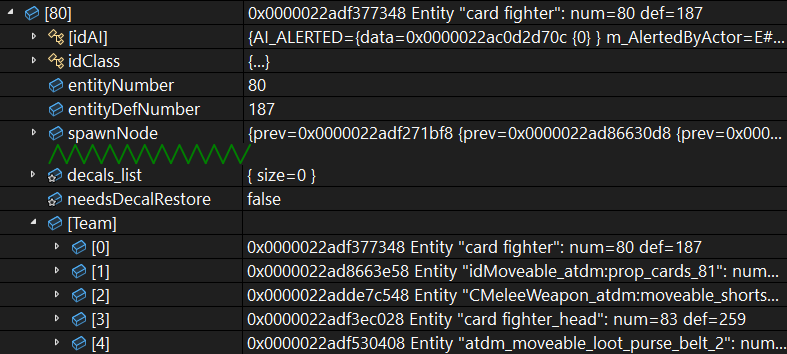
For example, game entities can be linked into so-called "teams" that are attached to each other and run through physics together, and these teams are organised as intrusive linked lists. Here is how I solve this issue in natvis:
<Type Name="idEntity">
    <DisplayString>Entity({entityNumber}): {name}</DisplayString>
    <Expand>
        <ExpandedItem>this,!</ExpandedItem>
        <Synthetic Name="[Team]">
            <Expand>
                <LinkedListItems>
                    <HeadPointer>teamMaster</HeadPointer>
                    <NextPointer>teamChain</NextPointer>
                    <ValueNode>this</ValueNode>
                </LinkedListItems>
            </Expand>
        </Synthetic>
    </Expand>
</Type>
Here is an example of how it looks in MSVC and CLion with synthetic "team" already expanded. The "card player" has head, sword, belt, and cards in his team:
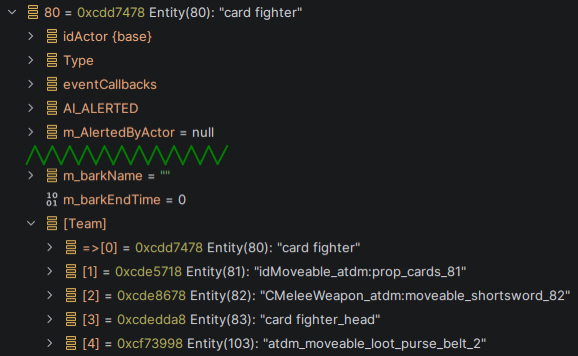
GDB pretty printers do not allow to return a tree from children method, and does not support synthetic values out of the box. But we can make a separate pretty-printer for each synthetic and pin it to the returned value like this:
class idEntityPrinter:

    class TeamSynthetic:
        def __init__(self, value):
            self.value = value
        def to_string(self):
            return ''
        def children(self):
            curr = self.value['teamMaster']
            k = 0
            res = []
            while int(curr) != 0:
                res.append(('[%d]' % k, curr))
                k += 1
                curr = curr.dereference()['teamChain']
            return res

    def __init__(self, value):
        self.value = value

    def to_string(self):
        return 'Entity(%d): %s ' % (
            int(self.value['entityNumber']),
            display_string(self.value['name'])
        )

    def children(self):
        res = raw_children_inline(self.value)
        child = ('[Team]', embed_printer_for_value(self.value, idEntityPrinter.TeamSynthetic))
        res.append(child)
        return res
It is not very fun to write a new class every time, so we can wrap the making of a class in a simple wrapper:
# returns a synthetic gdb.Value that can be expanded to display the given list of children
# children_lambda should be a lambda wrapping a list of children for lazy evaluation
def make_synthetic(children_lambda, display = ''):
    class SyntheticPrinter:
        def __init__(self, value):
            pass
        def to_string(self):
            return display
        def children(self):
            if callable(children_lambda):
                return children_lambda()
            else:
                return children_lambda
    return embed_printer_for_value(gdb.Value(0), SyntheticPrinter)
Now we can do everything inside the children method. Note that this new version also uses some of the utilities which will be defined later:
    def children(self):
        res = raw_children_inline(self.value)
        def synthetic():
            return linked_list_children_list(
                self.value['teamMaster'],
                lambda p: p.dereference()['teamChain'],
                marked_if = lambda p: int(p) == self.value.address,
            )
        child = ('[Team]', make_synthetic(synthetic))
        res.append(child)
        return res
Raw members
It is usually a bad idea to override the list of children in debugger visualization without providing some way to access all the "raw" members of the class. For example, idEntity class has so many members that listing them all in a pretty printer in order to add the "[Team]" synthetic is stupid. And even for small classes, there is always a risk that some new member will be added without updating the pretty printer, and someone's debug session will be spoiled.
The first approach is to list the raw members directly as children, as if you have listed all of them by hand. In natvis this is achieved by adding <ExpandedItem>this,!</ExpandedItem>, where exclamation mark means "use raw view", i.e. use the built-in view which behaves according to the default rules of the debugger. The second approach is to add a synthetic child with name [raw], that lists all the raw members when expanded. It is added automatically for every natvis rule, although you can opt-out by setting HideRawView="true" on Expand node.
In case of GDB pretty printers, all of this has to be implemented manually by using the API. In this implementation, I tried to mimic VS Code and show the contents of the base classes inside expandable synthetic children:
class RawSubclassPrinter:
    def __init__(self, value):
        # avoid TYPE_CODE_TYPEDEF
        value = value.cast(gdb.types.get_basic_type(value.type))
        self.value = value

    def to_string(self):
        return ''

    def children(self):
        res = []

        vtype = self.value.type
        assert vtype.code != gdb.TYPE_CODE_TYPEDEF

        if vtype.code in [gdb.TYPE_CODE_STRUCT, gdb.TYPE_CODE_UNION]:
            for f in vtype.fields():
                if f.artificial:
                    continue
                if f.is_base_class:
                    base_type = gdb.lookup_type(f.name)
                    base_value = self.value.cast(base_type)
                    child = ('%s {base}' % f.name, embed_printer_for_value(base_value, RawSubclassPrinter))
                    res.append(child)
                    continue
                child = (str(f.name), get_field(self.value, f))
                res.append(child)

        if vtype.code == gdb.TYPE_CODE_ARRAY:
            (n, elemtype) = get_array_length_and_element_type(vtype)
            for i in range(n):
                res.append(('[%d]' % i, self.value[i]))

        return res

class RawPrinter(RawSubclassPrinter):
    def __init__(self, value):
        super().__init__(value)

    def to_string(self):
        return '[expand to see raw children]'

# add this child to the returned list in SomePrinter.children to add expandable [raw] child like in natvis
def raw_child_expandable(value):
    return ('[raw]', embed_printer_for_value(value, RawPrinter))

# append this array to the returned list in SomePrinter.children to add raw members inline
def raw_children_inline(value):
    return RawPrinter(value).children()
The usage example of the first approach has been shown on idEntity at the end of the previous section.
Here is how the second approach is used for a std::vector-like container we saw above:
class idListPrinter:
    def children(self):
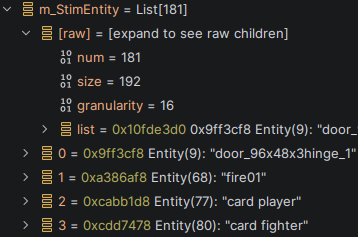
        res = [raw_child_expandable(self.value)]
        res += array_children_list(self.value['list'], self.value['num'])
        return res
The function array_children_list will be described later: it returns the list with all the elements of the dynamic array. The raw synthetic child is added just before that. Here is how it looks:
Default printer
It is sometimes useful to have a function that returns display string or children of any gdb.Value.
For example, here is the natvis rule using ExpandedItem:
<Type Name="idBoxOctree::Link">
    <DisplayString>link to {*(idClipModel*)object}</DisplayString>
    <Expand>
        <ExpandedItem>*(idClipModel*)object</ExpandedItem>
    </Expand>
</Type>
And it can be transformed into GDB pretty printers like this:
class idBoxOctreeLinkPrinter:
    wildcard = 'idBoxOctree::Link'

    def __init__(self, value):
        self.value = value
        pcm_type = gdb.lookup_type('idClipModel*')
        self.pobject = self.value['object'].cast(pcm_type)

    def to_string(self):
        return 'link to ' + display_string(self.pobject.dereference())

    def children(self):
        return children_of(self.pobject.dereference()) + [raw_child_expandable(self.value)]
Thanks to the API function gdb.default_visualizer, both children_of and display_string are easy to implement, although one has to decide how these functions should work for the types not covered by a pretty printer:
# returns "display string" for a value (in natvis terms)
# this is what MatchedPrinter.to_string returns, without looking at children
# works fine for types without pretty-printer, e.g. primitive type
def display_string(value):
    if not isinstance(value, gdb.Value):
        return str(value)
    pp = default_visualizer(value)
    if pp:
        return pp.to_string()
    simple = print_simple_value(value)
    if simple is not None:
        return simple
    return '???'

# returns children list for a value
# this is what MatchedPrinter.children returns
# returns raw members for a type without pretty-printer (empty for primitive types)
def children_of(value, skip_raw_child = True):
    pp = default_visualizer(value)
    if not pp:
        return raw_children_inline(value)
    res = []
    for x in pp.children():
        if skip_raw_child and x[0] == '[raw]':
            continue
        res.append(x)
    return res

# getting custom pretty printer for a given value
# note: AutoDisplayStringPrinter is considered "default", not "custom"
def default_visualizer(value):
    pp = gdb.default_visualizer(value)
    if isinstance(pp, AutoDisplayStringPrinter):
        return None
    return pp

# which values are allowed to be printed using builtin GDB algorithm
# we must be very careful to avoid the infinite deep-printing issue of GDB here!
def print_simple_value(value):
    vtype = gdb.types.get_basic_type(value.type)
    if vtype.code in [gdb.TYPE_CODE_ENUM, gdb.TYPE_CODE_INT, gdb.TYPE_CODE_FLT, gdb.TYPE_CODE_CHAR, gdb.TYPE_CODE_BOOL]:
        return str(value)
    if vtype.code in [gdb.TYPE_CODE_PTR, gdb.TYPE_CODE_ARRAY] and vtype.target().name == 'char':
        if vtype.code == gdb.TYPE_CODE_PTR and int(value) == 0:
            return 'null'
        try:
            return '"' + str(value.string()) + '"'
        except:
            return 'bad'
    return None
Some notes about implementation:
-
gdb.default_visualizeris wrapped intodefault_visualizerthat skipsAutoDisplayStringPrinter. This is done for the auto-summary feature. -
The function
print_simple_valuecan convert scalar C++ values and C-strings to Python strings. Recall that converting gdb.Value to str can freeze GDB because of deep-printing. -
By convention,
children_ofautomatically filters away the[raw]child, which is present in many types.
These two functions are not very useful by themselves. They can be avoided because usually the type of the target value is known, so we can just construct pretty printer directly and call its children/to_string method. However, these functions can be used in generic context, as we'll see in the chapter about declarative printers.
Arrays and lists
Natvis has built-in elements like ArrayItems and LinkedListItems to display contents of these standard data structures. Here are some helpers which do the same, just to avoid copy/pasting the same code everywhere:
# returns all elements of the given array as a list of children
def array_children_list(ptr_value, count_value):
    n = int(count_value)
    res = []
    for i in range(n):
        res.append((str(i), ptr_value[i]))
    return res

# returns all elements of the given linked list as a list of children
# terminates on None, null pointer, optional lambda, or revisiting the same node
def linked_list_children_list(first_node, func_next_node, func_item_of_node = None, *, terminate_if = None, marked_if = None):
    if not terminate_if:
        terminate_if = lambda p: False
    if not func_item_of_node:
        func_item_of_node = lambda p: p
    if not marked_if:
        marked_if = lambda p: False
    pnode = first_node
    res = []
    visited_addresses = set()
    while pnode and int(pnode) != 0 and not terminate_if(pnode):
        k = len(res)
        name = '[%d]' % k
        if marked_if(pnode):
            name = '=>' + name
        cycled = int(pnode) in visited_addresses
        if cycled:
            name = '[cycle]'
        res.append((name, func_item_of_node(pnode)))
        visited_addresses.add(int(pnode))
        if cycled:
            break
        pnode = func_next_node(pnode)
    return res