This article is part 4 of the Natvis-like experience with GDB pretty printers series:
Even with semi-declarative pretty printers, it is hardly possible to define a custom printer for every struct in the codebase. So it is great to have some automatic display string generation algorithm which works on everything and makes sense. MSVC debugger deep-prints all the types which are not customized. GDB does not, because we already know that its implementation is unacceptable.
Deep printing algorithm can be used safely if it accepts an extra parameter \(M\) such that:
- Only the first \(M\) characters are returned if the full output length exceeds \(M\) or is infinite.
- The whole request takes \(O(L)\) time, where \(L\) is the number of characters returned.
The parameter \(M\) can be deduced from the width of the GUI field or simply hardcoded to some sane limit.
An algorithm with such properties can be achieved by traversing the children tree recursively, appending all the strings on the fly, and stopping immediately when the length limit is achieved. It is critical that we print at least one character when we enter any node of the tree (e.g. opening brace), otherwise we can go into infinite recursion. If listing the first \(k\) children of a node takes \(O(k)\) time, then this algorithm works strictly in \(O(L)\) time. There is no need for such strictness in the real practice, of course.
Deep printing implementation
To begin with, we need some container to handle the limited concatenation:
# helper for simple concatenation of strings into a text of limited length
class StringBuilder:
    # return True on overflow
    def append(self, s):
        ...
    def finalize(self):
        ...
The recursive function which deep-prints a value accepts a builder and pushes all the results into it.
# appends deep-printed text for the given value
# return True iff build is overflown after the call
def append_deep_summary(builder, value):
    simple = print_simple_value(value)
    if simple is not None:
        return builder.append(simple)

    # avoid TYPE_CODE_TYPEDEF
    value = value.cast(gdb.types.get_basic_type(value.type))

    if value.type.code == gdb.TYPE_CODE_ARRAY:
        (n, elemtype) = get_array_length_and_element_type(value.type)
        if builder.append('{ '):
            return True
        for i in range(n):
            if i > 0 and builder.append(', '):
                return True
            if append_deep_summary(builder, value[i]):
                return True
        if builder.append(' }'):
            return True
        return False

    pp = default_visualizer(value)
    if pp and not getattr(type(pp), 'auto_summary', False):
        # never deep-print custom types with pretty-printer
        return builder.append(pp.to_string())

    if value.type.code == gdb.TYPE_CODE_PTR:
        if int(value) == 0:
            return builder.append('null')
        if builder.append('0x{:x} '.format(int(value))):
            return True
        try:
            target_value = value.dereference()
        except:
            return builder.append('bad') # includes void
        return append_deep_summary(builder, target_value)

    if value.type.code not in [gdb.TYPE_CODE_STRUCT, gdb.TYPE_CODE_UNION]:
        return builder.append('???')

    count = 0
    def process_base(tvalue):
        for f in tvalue.type.fields():
            if f.artificial:
                continue
            if f.is_base_class:
                base_type = gdb.lookup_type(f.name)
                base_value = tvalue.cast(base_type)
                if process_base(base_value):
                    return True
                continue
            nonlocal count
            if builder.append('%s%s: ' % (', ' if count > 0 else '', f.name)):
                return True
            count += 1
            if append_deep_summary(builder, get_field(tvalue, f)):
                return True
        return False

    if builder.append('{ '):
        return True
    if process_base(value):
        return True
    if builder.append(' }'):
        return True
    return False
You can notice that some code that duplicates previous sections:
- Enumerating raw members of struct/union. But this time base classes are flattened, and we can early-out on output overflow.
- Enumerating array elements. This time with early-out.
- Resolving pointers by prepending address.
This is how this traversal can be used to get the final string output:
# returns auto summary as a final string with limit applied
# for performance reasons, it should not be concatenated with anything else...
def get_auto_summary_as_string(value, prefix = ''):
    builder = StringBuilder()
    builder.append(prefix)
    if value is not None:
        append_deep_summary(builder, value)
    return builder.finalize()
Default display string
Recall that we want this algorithm to be used for all non-customized types. Let's put it into to_string method of a pretty printer:
# pretty-printer to produce auto-summary for non-customized types
class AutoDisplayStringPrinter:
    def __init__(self, value, prefix = ''):
        self.value = value
        self.prefix = prefix
    def to_string(self):
        return get_auto_summary_as_string(self.value, self.prefix)
    def children(self):
        if self.value is None:
            return []
        return raw_children_inline(self.value)
Here are some examples of summaries generated by this algorithm. Includes structs, pointers, strings, customized types.
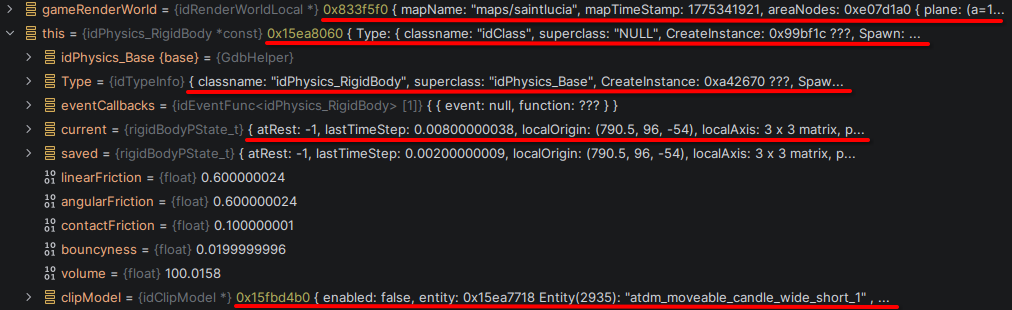
Unfortunately, we can't put this pretty printer into our TdmPrettyPrinterCollection for two reasons: 1) it needs to match all types, and 2) it has to have the least priority among everything. A custom collection class is needed. But it needs some of the same code, so it looks like a big chunk of copy/paste, which is not very interesting.
What is interesting is how this auto-summary pretty printer is registered in GDB:
def register_auto_display_string(event = None):
    # according to docs, gdb.pretty_printers has the least priority of 3 groups
    for i, x in enumerate(gdb.pretty_printers):
        if isinstance(x, gdb.printing.PrettyPrinter) and x.name == 'auto_display_string_printer':
            del gdb.pretty_printers[i]
            break
    gdb.pretty_printers.append(AutoDisplayStringDefaultPrinterCollection())
    # CLion has builtin printer 'lookup' which covers all arrays in a way we don't like
    # in order to see array contents in display string, we have to override it
    gdb.execute('disable pretty-printer global lookup')

if ENABLE_AUTO_SUMMARY:
    # delay registration until executable is loaded into GDB
    # this allows us to set this pretty printer last
    # also it is necessary because 'lookup' is loaded late
    gdb.events.executable_changed.connect(register_auto_display_string)
    # but also run it now: this helps for manual refresh of pretty printers without restarting debugging
    register_auto_display_string()
First, we register the collection differently, we register it to the global list, which has the least priority. Thus deleting the old version on hot-reload is something to be implemented manually.
Second, CLion has built-in pretty printer collection called lookup, which is weaker than our auto-summary but has greater priority. This built-in collection is registered after .gdbinit is finished, so we have to subscribe to executable_changed GDB event in order to disable it properly.
Custom printers and auto-summary
As long as we are careful regarding performance, we can also use the auto-summary inside our custom printers. For example, this is how we make idListPrinter show its elements in the display string:
class idListPrinter:
    ...
    def to_string(self):
        n = int(self.value['num'])
        header = 'List[%d]' % n
        if ENABLE_AUTO_SUMMARY:
            builder = StringBuilder()
            builder.append(header + ' { ')
            for i in range(n):
                if i > 0:
                    builder.append(', ')
                if append_deep_summary(builder, self.value['list'][i]):
                    break
            builder.append(' }')
            return builder.finalize()
        else:
            return header
Here is an example with deep-printed array elements underlined:
